What Happens When a Guest Calls
See how HelloShift's Voice AI handles incoming calls — from greeting to FAQ answers to post-call follow-up actions.
When guests call your HelloShift texting number, the behavior depends on your plan and Voice AI settings.
Overview
Guest Plan Behavior
By default, when Voice Assistant is disabled:
Caller hears a recorded message
Message directs them to call the Front Desk number
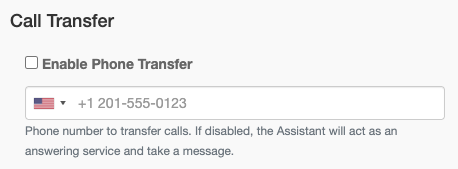
Front Desk number is set in Call Transfer settings
Optional Configurations (by request)
Setting the Call Transfer Number
Go to AI & Automation > Voice
Enter your Call Transfer number
Save settings
Checkin Plan with Voice AI
When Voice Assistant is enabled, guests experience intelligent call handling:
Call Flow
Dial First (Optional): System rings your hotel number first
Configure wait time (default: 15 seconds)
Set active hours (e.g., 9 AM - 5 PM)
Outside hours, calls go directly to AI
AI Assistant Answers: If staff doesn't answer (or Dial First is off)
Greets the caller professionally
Responds to common questions
Looks up guest reservation details (if enabled)
Transfer or Take Message:
Transfers if caller asks for a human
Transfers for requests AI can't handle
Takes a message if no transfer number is set
What the AI Can Do
What the AI Cannot Do
Modify existing reservations
Complete actual bookings (except at properties in the voice booking pilot — see Booking Rooms by Phone (Pilot))
Access payment information
The AI will say "I'll have our staff contact you" for requests it cannot handle.
Accessing Call Transcripts
Every call is automatically transcribed and recorded.
Finding Transcripts
Go to Guest Directory
Search by phone number or guest name
Open the guest's conversation
Find the Voice Call note
Transcript Contents
Full conversation text
Call recording (click to play)
Call duration
AI-generated summary
Card numbers are never kept. If a caller reads a credit card number aloud, it is replaced with [card number removed] in the transcript and summary, and the recording link is withheld for that call.
Troubleshooting
Calls Not Going to AI
Verify Voice Assistant is enabled
Check phone number configuration
Confirm you're on Checkin Plan
Transfers Not Working
Use full phone number with country code
Verify destination is reachable
Check extension format (digits only)
Related Articles
Was this helpful?
Still need help? Ask the team