Twilio Setup
Configure Twilio for SMS guest messaging and Voice AI phone calls in HelloShift — number setup and A2P registration.
Configure Twilio for SMS messaging and phone calls with guests. Twilio provides the communication infrastructure for text messages and voice features in HelloShift.
Overview
Requirements
Before setting up:
HelloShift Guest plan or higher
Business information for registration
Initial Setup
HelloShift configures Twilio during your account setup. Contact support to get started.
What HelloShift Provides
Phone Number: A dedicated number for your property
SMS Configuration: Incoming/outgoing message routing
Webhook Setup: Automatic message delivery to HelloShift
What You Need to Provide
Business Registration information (for A2P 10DLC)
Property details for caller ID display
A2P 10DLC Registration
To send SMS messages in the US, you must complete A2P (Application-to-Person) 10DLC registration.
Why Registration is Required
Carrier Requirements: US carriers require business verification
Deliverability: Registered numbers have better delivery rates
Compliance: Meets industry regulations for business texting
Registration Process
Go to Admin > Integrations
Click the Twilio tab
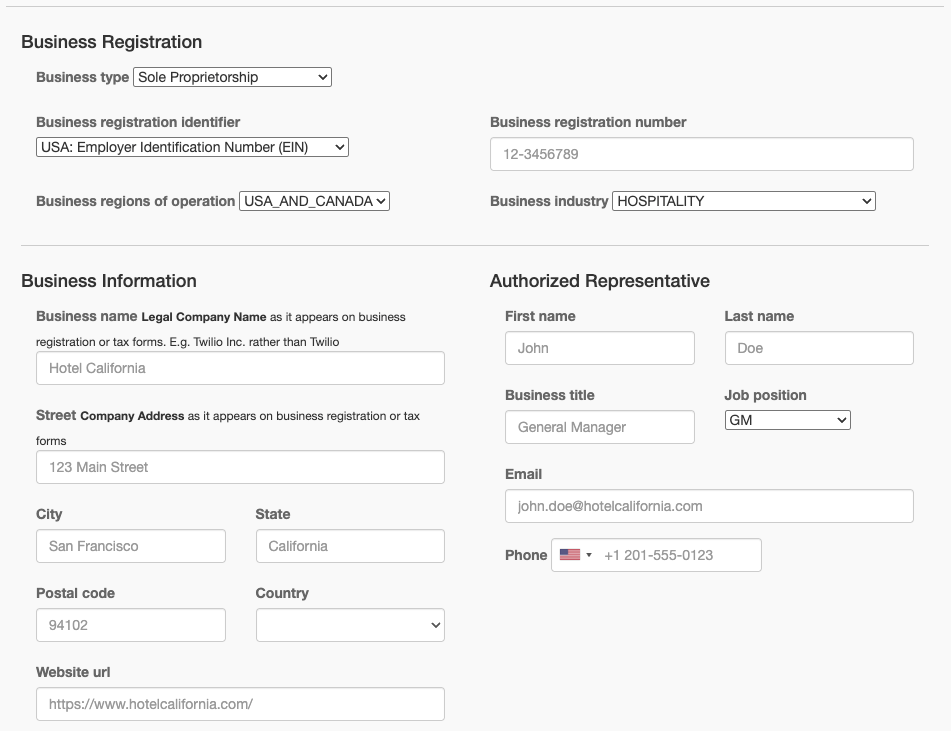
Complete the Business Registration form:
Business Information
Authorized Representative
Click Submit Registration
Wait for verification (typically 3-5 business days)
Registration Status
After submission, your status will be:
If rejected, you'll receive details about what needs to be corrected.
SMS Opt-In Consent
Properties that use third-party booking engines (Expedia, Booking.com, etc.) cannot add SMS consent to their booking pages. SMS Opt-In Consent provides an alternative way to collect explicit guest consent before sending text messages, as required by A2P 10DLC regulations.
When to Enable
Enable SMS Opt-In if your property:
Cannot add an SMS consent checkbox to your booking page
Needs to send pre-arrival SMS messages before check-in
Do not enable if your booking engine already collects SMS consent — the standard A2P registration is sufficient.
How to Enable
Go to Admin > Settings > Messaging
Toggle SMS Opt-In to ON
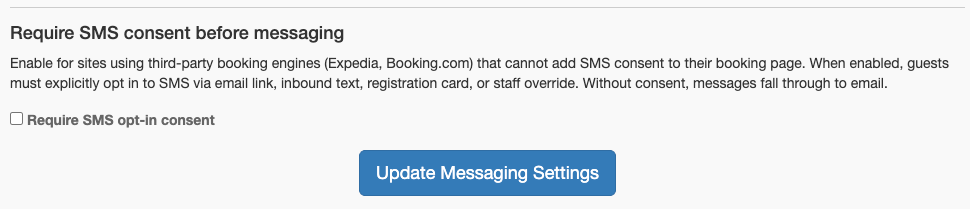
When enabled, the system requires explicit guest consent before sending any SMS. Messages automatically fall through to email until consent is provided.
How It Works
When SMS Opt-In is enabled and a guest has not yet consented:
SMS is skipped in the channel priority list
Messages fall through to the next available channel (typically email)
Once the guest provides consent, SMS becomes available again
This ensures guests always receive their messages — just via email until they opt in to SMS.
How Guests Provide Consent
Sending Get-Info Emails
The Get-Info tab in the Guest Directory shows guests who still need to provide their phone number or SMS consent. To request consent:
Go to Guests > Get-Info tab
Select the guests you want to contact
Choose a Get-Info email template and click Preview & Send
The email includes a link to the guest's profile page where they can provide their phone number and check the SMS consent checkbox.
You can also set up a Guest Automation to send Get-Info emails automatically to arriving guests who haven't yet consented.
Managing Consent
To manually grant or revoke SMS consent for a guest:
Open the guest's profile in the Guest Directory
Click the three-dot menu in the guest header
Select Grant SMS Consent or Revoke SMS Consent
When a guest texts STOP, both messaging and SMS consent are revoked automatically.
Phone Number Configuration
Your Twilio Number
Your HelloShift site has a dedicated phone number for:
Receiving guest text messages
Sending SMS to guests
Voice AI calls (if enabled)
Viewing Your Number
Go to Admin > Integrations
Click the Twilio tab
Your number is displayed at the top
Number Capabilities
Message Settings
Configuring SMS Behavior
Go to Admin > Settings > Messaging
Configure messaging options:
Character Limits
URL Shortening
Long URLs are automatically shortened to save characters and track clicks.
Understanding Costs
How SMS Billing Works
Outbound SMS: Charged per message segment
Inbound SMS: Charged per message
MMS: Higher rate than SMS
Long messages: Split into multiple segments
Reducing Costs
Use snippets: Pre-written messages are optimized
URL shortening: Reduces character count
Channel priority: Route to email for long content
WhatsApp: Often cheaper for international guests
Monitoring Usage
Contact HelloShift support for usage reports or billing questions.
Troubleshooting
Messages not sending
Possible Causes:
A2P registration incomplete
Number blocked by carrier
Invalid phone number
Rate limits exceeded
Solutions:
Complete A2P 10DLC registration
Contact support if number seems blocked
Verify guest phone number format
Wait and retry (rate limits reset)
Messages not receiving
Possible Causes:
Webhook misconfiguration
Guest number invalid
Guest opted out (STOP)
Solutions:
Contact support to verify webhooks
Ask guest to verify their number
Check guest's opt-out status
"Undelivered" message status
Possible Causes:
Guest phone unreachable
Carrier rejected message
Invalid number format
Solutions:
Verify phone number with guest
Try alternative contact method
Check for carrier-specific issues
Registration rejected
Possible Causes:
Incorrect business information
Mismatched business name
Invalid identifier
Solutions:
Review rejection details
Correct information and resubmit
Use exact registered business name
Verify EIN/DUNS is correct
Voice AI Integration
If you have Voice AI enabled, Twilio also handles phone calls.
Voice Features
See Voice AI Assistant for voice configuration.
Best Practices
Message Content
Identify yourself: Include property name
Keep it brief: SMS should be concise
Include context: Reference reservation or request
Clear call-to-action: What should guest do next
Timing
Compliance
Collect consent: Enable SMS Opt-In if guests book through third-party sites
Honor opt-outs: Never message after STOP
Identify your business: Include property name
Purpose: Only message about their stay
Frequency: Don't over-message (3-4 per stay max)
Related Articles
WhatsApp & Messenger Setup - Additional messaging channels
All About Guest Messaging - Complete messaging guide
Voice AI Assistant - Phone call handling
Guest Automations - Automated messaging