Shift4 Payment Setup
Configure Shift4 payment processing for guest check-in payments and deposits in HelloShift.
Connect your Shift4 account to HelloShift to capture deposits during contactless check-in, accept digital tips, and process guest shop payments.
For an overview of payment features and configuration, see Guest Payments Overview.
Requirements
A Shift4 merchant account
Your Auth Token from Shift4
HelloShift subscription with Guest+ plan
Connecting Your Shift4 Account
Step 1: Obtain Your Auth Token
Contact your Shift4 representative or access your Shift4 merchant portal
Request an Auth Token for API integration
This token is used to generate access tokens for payment processing
Step 2: Access Payment Settings
Go to Admin > Integrations > Guest Payments
Click the Shift4 tab
Step 3: Enter Credentials
Enter your Auth Token in the form field
Click Save and fetch Access Token
HelloShift will automatically fetch an access token from Shift4
Once complete, you will see the token ending displayed confirming the connection.
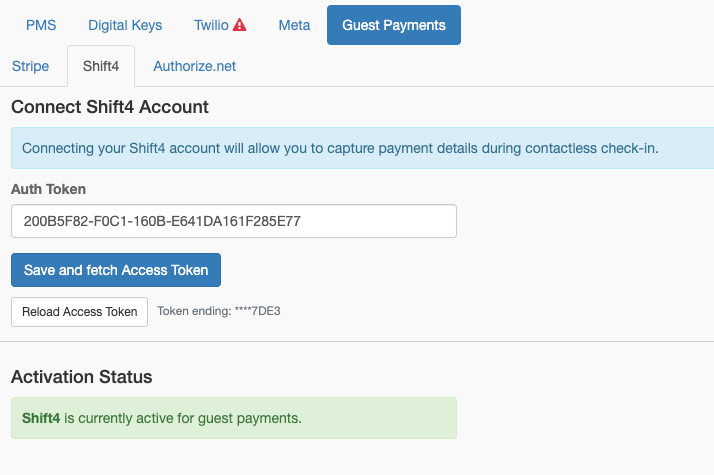
Step 4: Activate Shift4
After credentials are saved, click Activate Shift4
The system will switch from any previously active provider
Refreshing Access Token
If you experience payment processing issues, you may need to refresh the access token:
Go to Admin > Integrations > Guest Payments
Click the Shift4 tab
Click Reload Access Token
Viewing Payments
For detailed payment management, log in to your Shift4 merchant portal to view transactions, capture funds, issue refunds, and manage disputes.
Troubleshooting
Access token errors
Possible Causes:
Auth token is invalid or expired
Network connectivity issues
Solutions:
Verify auth token with Shift4
Click Reload Access Token
Contact Shift4 support if issues persist
Payment form not loading
Possible Causes:
Access token expired
Browser blocking iframe
Solutions:
Refresh access token in settings
Guest should disable ad blockers
Try a different browser
For general payment troubleshooting, see Guest Payments Overview.